![Logo-White-1.png]](https://docs.yogobooking.com/hs-fs/hubfs/Logo-White-1.png?height=40&name=Logo-White-1.png)
What does it mean that a customer is blocked?
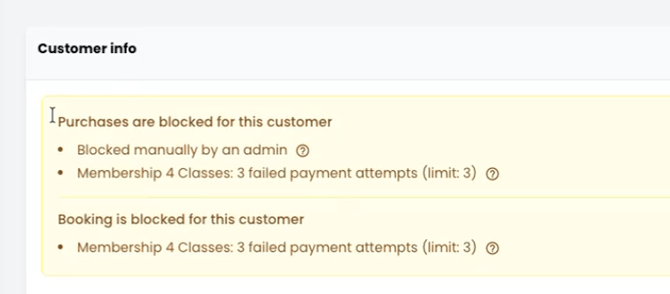
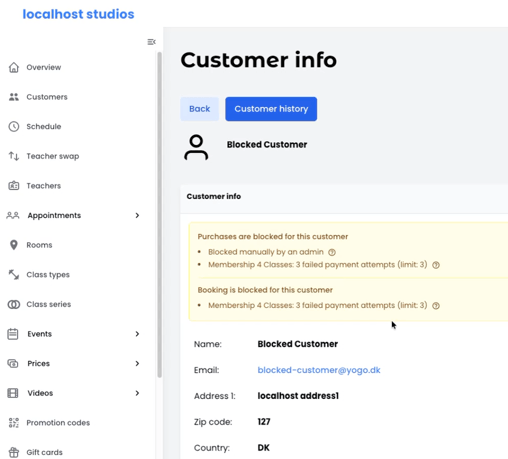
When a customer is blocked in YOGO, you can now see it directly on the customer's profile. You can see which blocks apply to the customer and what caused them. This gives you a clear overview when a customer asks why they can't book or buy.
Types of blocks
Manual purchase block
Set by an admin user on the customer's profile. The customer can't make new purchases but can still use existing memberships and class passes.
Block after failed renewals
Set automatically when the customer's membership fails to renew a certain number of times. The customer can't make new bookings. You decide the number in Admin → settings → Membership → Failed payments
Examples of use
- The customer owes money: Put a manual purchase block on them until it's sorted out.
- The customer should no longer come to the studio: Put a manual purchase block on them, stop the membership and cancel existing bookings.
- The customer asks why they can't book: Open the customer's profile and see which block applies and how it can be removed.
1. See a customer's blocks
Go to "Customers" and open the customer you want to see. If the customer is blocked, you can see which blocks apply and why.
Hover over the "?" next to a block to read what it means and how the customer can have it removed.
2. Put a manual purchase block on a customer
Open the customer's profile and click "[block purchases for this customer]". The customer can now no longer make new purchases.
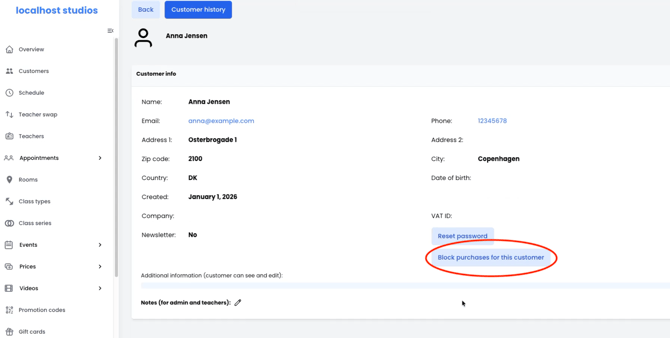
The manual purchase block only blocks new purchases. If the customer already has a membership or a class pass, they can still use it and book classes with it.
Remember: You can't put a manual purchase block on other admin users.
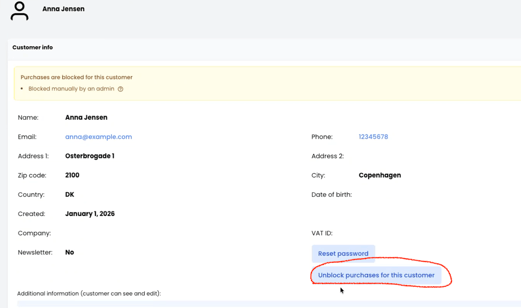
3. Remove a manual purchase block
Open the customer's profile and click the same button again. The block is removed right away, and the customer can make purchases again.
I want to block a customer completely. What do I do?
In YOGO, you can't block a customer from logging in, and there is no manual booking block. If you want to stop a customer from using your studio, you need to combine a few actions:
- Put a manual purchase block on the customer, so they can't buy anything new.
- Stop the customer's membership or remove their class pass, so they can't book with it.
- Cancel the customer's existing bookings if they shouldn't attend them.
👉 Tip: If you want to stop customers from booking when their payment fails, use the setting for how many failed renewals it takes before a customer can't make new bookings.